
Publishing Lightroom Galleries to WordPress
If you use Adobe Lightroom Classic and run a self-hosted WordPress site, you’ve probably looked at the various plugins that promise to wire the two together — only to find they all want a recurring subscription fee. For a personal blog where you just want to post the occasional gallery, that feels like overkill.
This post walks through a free alternative I put together using WordPress’s built-in REST API and a small Python script. Once it’s set up, the workflow is:
- Export from Lightroom as normal (2048px JPEG)
- Run one command pointing at the export folder
- Open the draft WordPress creates, add your text, publish
No subscriptions. No third-party services. Just Python, which is already on your Mac. It might work on a PC if you have Python, but I have not tried it.
What You Need
- Adobe Lightroom Classic (any recent version)
- A self-hosted WordPress site (WordPress.org — this won’t work on WordPress.com free/personal plans)
- Python 3 — already installed on macOS
- WordPress 5.6 or later (for Application Passwords support)
Step 1 — Set Up the Python Environment
macOS protects its system Python from having packages installed into it directly. The fix is a virtual environment — a self-contained folder for your dependencies. Open Terminal and paste this single line:
python3 -m venv ~/wp-uploader-env && source ~/wp-uploader-env/bin/activate && pip install requestsThis creates the environment, activates it, and installs the one library the script needs (requests). You only ever need to run this once.
Step 2 — Create a WordPress Application Password
Application Passwords are built into WordPress and let external tools authenticate securely without using your main login password.
- Log into your WordPress admin dashboard
- Go to Users ? Profile
- Scroll to the bottom — you’ll find the Application Passwords section
- Type a name (e.g.
Lightroom Upload) and click Add New Application Password - Copy the password WordPress shows you — it only appears once
?? WordPress only shows this password once. Copy it immediately. If you lose it, delete it and generate a new one — no harm done.
Step 3 — Download and Configure the Script
Download wp_gallery_upload.py and save it somewhere sensible — I use ~/Documents/coding/wordpress/. Open it in any text editor and fill in the three lines at the top:
WP_URL      = "https://your-site.com"          # Your WordPress site URL
WP_USERNAME = "your_username"                   # Your WordPress username
WP_APP_PASS = "xxxx xxxx xxxx xxxx xxxx xxxx"  # Application Password from Step 2
That’s the only configuration needed. Make sure WP_URL has no trailing slash.
Step 4 — Export from Lightroom
Nothing special to install. Use your normal Lightroom export workflow (File ? Export or Shift+Cmd+E) with these settings:
| Setting | Value |
|---|---|
| Format | JPEG |
| Quality | 85 |
| Colour Space | sRGB |
| Resize to fit | Long Edge — 2048 px |
| Resolution | 72 ppi |
| Sharpen for | Screen, Standard |
| Export location | A dedicated folder per gallery |
Step 5 — Run the Script
Open Terminal, activate the environment, then point the script at your export folder:
source ~/wp-uploader-env/bin/activate

python3 ~/Documents/coding/wordpress/wp_gallery_upload.py ~/Pictures/my-gallery --title "My Post Title"
You’ll see each image tick off as it uploads, then a confirmation with a direct link to the new draft post. Click it, add your text, and publish.
Optional — Raycast Integration
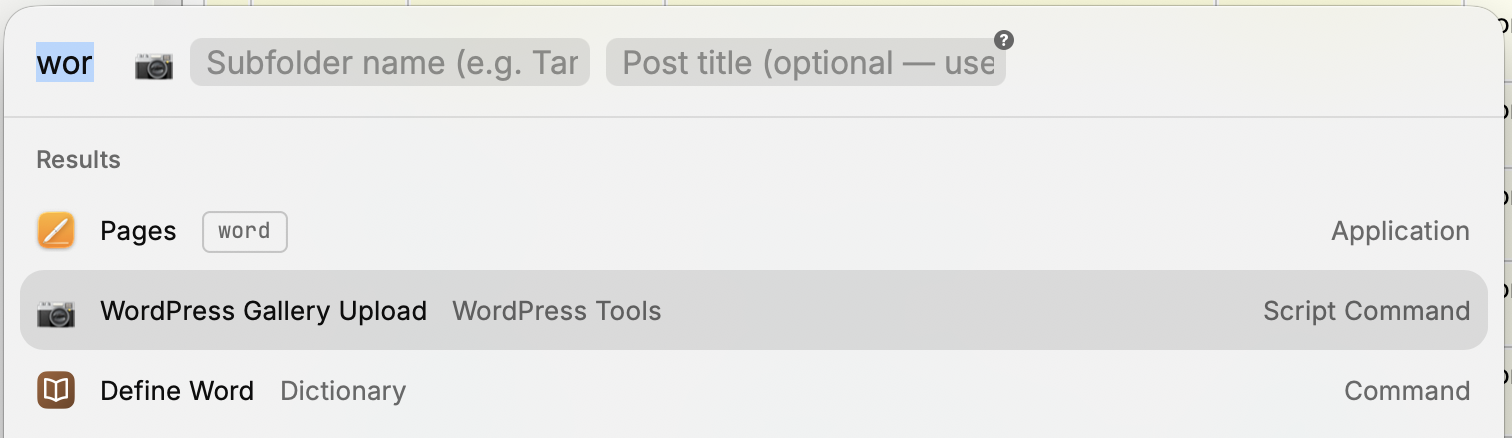
If you use Raycast, you can wrap this as a Script Command so you never touch Terminal. Download wpgallery.sh, set your base folder at the top of the file, drop it in your Raycast scripts folder, and reload Script Commands in Raycast settings.
After that your workflow is: open Raycast, type WordPress Gallery Upload, enter the subfolder name, optionally add a title, press Enter. Raycast streams the upload progress in its output panel and prints the edit link when it’s done.
The script is smart about paths — if you type just MyUpload it prepends your configured base folder automatically, but you can also type a full path for a one-off upload from anywhere.
Troubleshooting
401 Authentication error
Check your username and Application Password. Make sure you copied the full password from WordPress. If in doubt, delete it in WordPress and generate a fresh one.
Cannot connect to site
Confirm WP_URL uses https:// and has no trailing slash. Check the site is reachable in a browser.
Timeout errors
Your server may have a short maximum execution time. Try uploading fewer images at once, or increase the PAUSE_BETWEEN value in the script. Security plugins like Wordfence can also block REST API requests — check your firewall rules if uploads are being rejected.
No JPEG files found
The script looks for .jpg and .jpeg extensions. Make sure your Lightroom export format is set to JPEG (not TIFF or original).
Scripts
Both files are shown below so you can check them out before downloading.
wp_gallery_upload.py — the main upload script
#!/usr/bin/env python3
"""
WordPress Gallery Uploader
==========================
Uploads a folder of JPEG images to WordPress via the REST API
and creates a draft blog post with a Gutenberg gallery block.

Setup:
  1. In WordPress admin, go to Users ? Profile ? scroll to the bottom
  2. Under "Application Passwords", type a name (e.g. "Lightroom Upload")
     and click "Add New Application Password"
  3. Copy the password shown (with spaces is fine — paste it as-is below)
  4. Fill in your details in the CONFIGURATION section below

Usage:
  python3 wp_gallery_upload.py /path/to/your/exported/images
  python3 wp_gallery_upload.py /path/to/images --title "My Gallery Post"

Requirements:
  pip3 install requests Pillow
"""

import argparse
import sys

import json
import os
import sys
import time
from pathlib import Path

# ?????????????????????????????????????????????
#  CONFIGURATION — fill these in before running
# ?????????????????????????????????????????????

WP_URL      = "https://your-site.com"          # Your WordPress site URL (no trailing slash)
WP_USERNAME = "your_username"                   # Your WordPress username
WP_APP_PASS = "xxxx xxxx xxxx xxxx xxxx xxxx"  # Application Password from WordPress profile

# ?????????????????????????????????????????????
#  OPTIONS — adjust if needed
# ?????????????????????????????????????????????

POST_STATUS    = "draft"           # "draft" or "publish"
IMAGE_QUALITY  = 85                # JPEG quality for re-save check (0–100)
SUPPORTED_EXTS = {".jpg", ".jpeg", ".JPG", ".JPEG"}
PAUSE_BETWEEN  = 0.5               # Seconds to pause between uploads (be kind to your server)

# ?????????????????????????????????????????????


def get_session(username: str, app_password: str):
    """Return a requests Session with Basic Auth configured."""
    import requests
    from requests.auth import HTTPBasicAuth
    session = requests.Session()
    session.auth = HTTPBasicAuth(username, app_password.replace(" ", ""))
    session.headers.update({"User-Agent": "WP-Gallery-Uploader/1.0"})
    return session


def check_connection(session, wp_url: str) -> bool:
    """Verify we can reach the WordPress REST API and authenticate."""
    import requests
    url = f"{wp_url}/wp-json/wp/v2/users/me"
    try:
        r = session.get(url, timeout=15)
        if r.status_code == 200:
            name = r.json().get("name", "Unknown")
            print(f"? Connected to WordPress as: {name}", flush=True)
            return True
        elif r.status_code == 401:
            print("? Authentication failed. Check your username and Application Password.", flush=True)
        else:
            print(f"? Unexpected response ({r.status_code}). Check your WP_URL.", flush=True)
        return False
    except requests.exceptions.ConnectionError:
        print(f"? Could not connect to {wp_url}. Check the URL and your internet connection.", flush=True)
        return False


def get_image_files(folder: Path) -> list[Path]:
    """Return sorted list of JPEG files in the folder."""
    files = sorted([
        f for f in folder.iterdir()
        if f.is_file() and f.suffix in SUPPORTED_EXTS
    ])
    return files


def upload_image(session, wp_url: str, image_path: Path) -> dict | None:
    """Upload a single image to the WordPress Media Library."""
    import requests

    url = f"{wp_url}/wp-json/wp/v2/media"
    filename = image_path.name

    with open(image_path, "rb") as f:
        image_data = f.read()

    headers = {
        "Content-Disposition": f'attachment; filename="{filename}"',
        "Content-Type": "image/jpeg",
    }

    try:
        r = session.post(url, headers=headers, data=image_data, timeout=60)
        if r.status_code == 201:
            media = r.json()
            print(f"  ? Uploaded: {filename} (ID: {media['id']})", flush=True)
            return media
        else:
            print(f"  ? Failed to upload {filename}: {r.status_code} — {r.text[:200]}", flush=True)
            return None
    except requests.exceptions.Timeout:
        print(f"  ? Timeout uploading {filename}. Try a smaller image or check your server.", flush=True)
        return None


def build_gallery_block(media_items: list[dict]) -> str:
    """Build a Gutenberg gallery block from a list of uploaded media items."""

    # Build individual image blocks inside the gallery
    image_blocks = []
    for media in media_items:
        media_id   = media["id"]
        media_url  = media["source_url"]
        media_link = media.get("link", "")
        alt_text   = media.get("alt_text", "")
        caption    = media.get("caption", {}).get("raw", "")

        img_block = (
            f'<!-- wp:image {{"id":{media_id},'
            f'"sizeSlug":"large","linkDestination":"media"}} -->\n'
            f'<figure class="wp-block-image size-large">'
            f'<a href="{media_url}">'
            f'<img src="{media_url}" alt="{alt_text}" class="wp-image-{media_id}"/>'
            f'</a>'
            f'{"<figcaption class=\'wp-element-caption\'>" + caption + "</figcaption>" if caption else ""}'
            f'</figure>\n'
            f'<!-- /wp:image -->'
        )
        image_blocks.append(img_block)

    ids_list = ",".join(str(m["id"]) for m in media_items)
    images_joined = "\n".join(image_blocks)

    gallery_block = (
        f'<!-- wp:gallery {{"ids":[{ids_list}],'
        f'"columns":3,"imageCrop":false,'
        f'"linkTo":"media","sizeSlug":"large"}} -->\n'
        f'<figure class="wp-block-gallery has-nested-images '
        f'columns-3 is-cropped">\n'
        f'{images_joined}\n'
        f'</figure>\n'
        f'<!-- /wp:gallery -->'
    )

    return gallery_block


def create_draft_post(session, wp_url: str, title: str,
                      gallery_block: str, status: str) -> dict | None:
    """Create a WordPress post containing the gallery block."""
    import requests

    url = f"{wp_url}/wp-json/wp/v2/posts"

    # Add a placeholder paragraph before the gallery for your text
    content = (
        f'<!-- wp:paragraph -->\n'
        f'<p>Add your post text here...</p>\n'
        f'<!-- /wp:paragraph -->\n\n'
        f'{gallery_block}'
    )

    payload = {
        "title":   title,
        "content": content,
        "status":  status,
    }

    try:
        r = session.post(url, json=payload, timeout=30)
        if r.status_code == 201:
            return r.json()
        else:
            print(f"? Failed to create post: {r.status_code} — {r.text[:300]}", flush=True)
            return None
    except requests.exceptions.Timeout:
        print("? Timeout creating post.", flush=True)
        return None


def main():
    parser = argparse.ArgumentParser(
        description="Upload a folder of images to WordPress and create a gallery post."
    )
    parser.add_argument(
        "folder",
        help="Path to the folder containing your exported JPEG images"
    )
    parser.add_argument(
        "--title",
        default="",
        help='Title for the new blog post (default: folder name)'
    )
    args = parser.parse_args()

    # ?? Validate folder ??????????????????????????????????????????????
    folder = Path(args.folder).expanduser().resolve()
    if not folder.exists() or not folder.is_dir():
        print(f"? Folder not found: {folder}", flush=True)
        sys.exit(1)

    post_title = args.title or folder.name

    # ?? Check config ?????????????????????????????????????????????????
    if "your-site.com" in WP_URL or "your_username" in WP_USERNAME:
        print("? Please edit the CONFIGURATION section at the top of this script", flush=True)
        print("  and fill in your WP_URL, WP_USERNAME, and WP_APP_PASS.", flush=True)
        sys.exit(1)

    # ?? Check requests is installed ??????????????????????????????????
    try:
        import requests  # noqa: F401
    except ImportError:
        print("? The 'requests' library is not installed.", flush=True)
        print("  Run:  pip3 install requests", flush=True)
        sys.exit(1)

    # ?? Find images ??????????????????????????????????????????????????
    images = get_image_files(folder)
    if not images:
        print(f"? No JPEG files found in: {folder}", flush=True)
        sys.exit(1)

    print(f"\n{'?'*50}", flush=True)
    print(f"  WordPress Gallery Uploader", flush=True)
    print(f"{'?'*50}", flush=True)
    print(f"  Folder : {folder}", flush=True)
    print(f"  Images : {len(images)} found", flush=True)
    print(f'  Post   : "{post_title}" ({POST_STATUS}, flush=True)')
    print(f"  Site   : {WP_URL}", flush=True)
    print(f"{'?'*50}\n", flush=True)

    # ?? Connect ??????????????????????????????????????????????????????
    session = get_session(WP_USERNAME, WP_APP_PASS)
    if not check_connection(session, WP_URL):
        sys.exit(1)

    # ?? Upload images ????????????????????????????????????????????????
    print(f"\nUploading {len(images, flush=True)} image(s)...\n")
    uploaded_media = []

    for i, image_path in enumerate(images, 1):
        print(f"  [{i}/{len(images, flush=True)}] {image_path.name}")
        media = upload_image(session, WP_URL, image_path)
        if media:
            uploaded_media.append(media)
        if i < len(images):
            time.sleep(PAUSE_BETWEEN)

    if not uploaded_media:
        print("\n? No images were uploaded successfully. Aborting post creation.", flush=True)
        sys.exit(1)

    print(f"\n? {len(uploaded_media, flush=True)}/{len(images)} images uploaded successfully.\n")

    # ?? Build gallery and create post ????????????????????????????????
    print("Creating gallery post...", flush=True)
    gallery_block = build_gallery_block(uploaded_media)
    post = create_draft_post(session, WP_URL, post_title, gallery_block, POST_STATUS)

    if post:
        post_id   = post["id"]
        edit_link = f"{WP_URL}/wp-admin/post.php?post={post_id}&action=edit"
        print(f"\n{'?'*50}", flush=True)
        print(f"  ? Post created successfully!", flush=True)
        print(f"  Title  : {post['title']['rendered']}", flush=True)
        print(f"  Status : {post['status']}", flush=True)
        print(f"  Edit   : {edit_link}", flush=True)
        print(f"{'?'*50}\n", flush=True)
        print("Next steps:", flush=True)
        print("  1. Open the edit link above in your browser", flush=True)
        print("  2. Replace the placeholder paragraph with your post text", flush=True)
        print("  3. Click Publish when you're ready\n", flush=True)
    else:
        print("\n? Post creation failed. Your images were uploaded to the Media Library.", flush=True)
        print(f"   You can create a post manually using them in WordPress admin.\n", flush=True)


if __name__ == "__main__":
    main()
wpgallery.sh — the optional Raycast Script Command wrapper
#!/bin/bash

# Required parameters:
# @raycast.schemaVersion 1
# @raycast.title WordPress Gallery Upload
# @raycast.mode fullOutput

# Optional parameters:
# @raycast.icon ?
# @raycast.packageName WordPress Tools
# @raycast.description Upload a folder of images to WordPress and create a draft gallery post

# Arguments:
# @raycast.argument1 { "type": "text", "placeholder": "Subfolder name (e.g. Tamron300samples)" }
# @raycast.argument2 { "type": "text", "placeholder": "Post title (optional — uses folder name if blank)", "optional": true }

# ?? SET YOUR BASE FOLDER HERE ??????????????????????????????????????
BASE_FOLDER="$HOME/Pictures"
# ??????????????????????????????????????????????????????????????????

SUBFOLDER="$1"
TITLE="$2"

# If the argument looks like a full path (starts with / or ~), use it directly.
# Otherwise treat it as a subfolder name inside BASE_FOLDER.
# This means you can type just "Tamron300samples" for ~/Pictures/the617/Tamron300samples
# or override with a full path like ~/Pictures/other-folder if needed.
if [[ "$SUBFOLDER" == /* ]] || [[ "$SUBFOLDER" == ~* ]]; then
    FOLDER="${SUBFOLDER/#\~/$HOME}"
else
    FOLDER="$BASE_FOLDER/$SUBFOLDER"
fi

# Activate the virtual environment
source ~/wp-uploader-env/bin/activate

# Run the Python script, passing title only if one was provided
if [ -n "$TITLE" ]; then
    python3 -u ~/Documents/coding/wordpress/wp_gallery_upload.py "$FOLDER" --title "$TITLE"
else
    python3 -u ~/Documents/coding/wordpress/wp_gallery_upload.py "$FOLDER"
fi